Cache API
This document provides an in-depth overview of the Cache API, also known as MUC (Moodle Universal Cache), a fundamental caching system within Moodle.
This document uses a hypothetical module plugin named myplugin as the focal point.
There is also a Cache API - Quick reference if you would rather read that.
Basic usage
Getting started with the Cache API is exceptionally straightforward. It's designed for quick and easy usage, emphasizing self-containment. All you need to do is add a definition for your cache and you are ready to start working with the Cache API.
Creating a definition
Cache definitions exist within the db/caches.php file for a component/plugin.
In the case of core that is the lib/db/caches.php file, in the case of a module that would be mod/myplugin/db/caches.php.
The definition is used API in order to understand a little about the cache and what it is being used for, it also allows the administrator to set things up especially for the definition if they want. From a development point of view the definition allows you to tell the API about your cache, what it requires, and any (if any) advanced features you want it to have.
The following shows a basic definition containing just the bare minimum:
$definitions = [
    'somedata' => [
        'mode' => cache_store::MODE_APPLICATION,
    ]
];
This informs the API that the myplugin module has a cache called somedata and that it is an application (globally shared) cache.
When creating a definition that's the bare minimum, to provide an area (somedata) and declare the type of the cache application, session, or request.
- An application cache is a shared cache, all users can access it.
- Session caches are scoped to a single users session, but may not actually be stored in the session.
- Request caches you can think of as static caches, only available to the user owning the request, and only alive until the end of the request.
There are of course many more options available that allow you to really take the cache by the reigns, you can read about some of the important ones further on, or skip ahead to the definition section which details the available options in full.
For each definition, a language string with the name cachedef_ followed by the name of the definition is expected.
Using the example above you would have to define:
$string['cachedef_somedata'] = 'This is the description of the cache somedata';
Getting a cache object
Once your definition has been created you should bump the version number so that Moodle upgrades and processes the definitions file at which point your definition will be useable.
Now within code you can get a cache object corresponding to the definition created earlier.
$cache = cache::make('mod_myplugin', 'somedata');
The cache::make() method is a factory method, it will create a cache object to allow you to work with your cache. The cache object will be one of several classes chosen by the API based upon what your definition contains. All of these classes will extend the base cache class, and in nearly all cases you will get one of cache_application, cache_session, or cache_request depending upon the mode you selected.
Using your cache object
Once you have a cache object (will extend the cache class and implements cache_loader) you are ready to start interacting with the cache.
There are three basic basic operations: get, set, and delete.
The first is to send something to the cache.
$result = $cache->set('key', 'value');
Easy enough. The key must be an int or a string. The value can be absolutely anything your want that is serializable.
The result is true if the operation was a success, false otherwise.
The second is to fetch something from the cache.
$data = $cache->get('key');
$data will either be whatever was being stored in the cache, or false if the cache could not find the key.
The third and final operation is delete.
$result = $cache->delete('key');
Again just like set the result will either be true if the operation was a success, or false otherwise.
You can also set, get, and delete multiple key => value pairs in a single transaction.
$result = $cache->set_many([
    'key1' => 'data1',
    'key3' => 'data3'
]);
// $result will be the number of pairs sucessfully set.

$result = $cache->get_many(['key1', 'key2', 'key3']);
print_r($result);
// Will print the following:
// array(
//     'key1' => 'data1',
//     'key2' => false,
//     'key3' => 'data3'
// )

$result = $cache->delete_many(['key1', 'key3']);
// $result will be the number of records sucessfully deleted.
That covers the basic operation of the Cache API.
In many situations there is not going to be any more to it than that.
Ad-hoc Caches
This is the alternative method of using the cache API.
It involves creating a cache using just the required params at the time that it is required. It doesn't require that a definition exists making it quicker and easier to use, however it can only use the default settings and is only recommended for insignificant caches (rarely used during operation, never to be mapped or customised, only existing in a single place in code).
Once a cache object has been retrieved it operates exactly as the same as a cache that has been created for a definition.
To create an ad-hoc cache you would use the following:
$cache = cache::make_from_params(cache_store::MODE_APPLICATION, 'mod_myplugin', 'mycache');
Don't be lazy, if you don't have a good reason to use an ad-hoc cache you should be spending an extra 5 minutes creating a definition.
The definition
The above section illustrated how to create a basic definition, specifying just the area name (the key) and the mode for the definition. Those being the two required properties for a definition.
There are many other options that will let you make the most of the Cache API and will undoubtedly be required when implementing and converting cache solutions to the Cache API.
The following details the options available to a definition and their defaults if not applied:
$definitions = [
    // The name of the cache area is the key. The component/plugin will be picked up from the file location.
    'area' => [
        'mode' => cache_store::MODE_*,
        'simplekeys' => false,
        'simpledata' => false,
        'requireidentifiers' => ['ident1', 'ident2'],
        'requiredataguarantee' => false,
        'requiremultipleidentifiers' => false,
        'requirelockingread' => false,
        'requirelockingwrite' => false,
        'requirelockingbeforewrite' => false,
        'maxsize' => null,
        'overrideclass' => null,
        'overrideclassfile' => null,
        'datasource' => null,
        'datasourcefile' => null,
        'staticacceleration' => false,
        'staticaccelerationsize' => null,
        'ttl' => 0,
        'mappingsonly' => false,
        'invalidationevents' => ['event1', 'event2'],
        'canuselocalstore' => false
        'sharingoptions' => cache_definition::SHARING_DEFAULT,
        'defaultsharing' => cache_definition::SHARING_DEFAULT,
    ],
];
Setting requirements
The definition can specify several requirements for the cache.
This includes identifiers that must be provided when creating the cache object, that the store guarantees data stored in it will remain there until removed, a store that supports multiple identifiers, and finally read/write locking.
The options for these are as follows:
simplekeys: [bool] Set to true if your cache will only use simple keys for its items.
Simple keys consist of digits, underscores and the 26 chars of the english language.a-zA-Z0-9_
If true the keys won't be hashed before being passed to the cache store for gets/sets/deletes.
It will be better for performance and possible only because we know the keys are safe.simpledata: [bool] If set to true we know that the data is scalar or array of scalar.
If true, the data values will be stored as they are. Otherwise they will be serialised first.requireidentifiers: [array] An array of identifiers that must be provided to the cache when it is created.requiredataguarantee: [bool] If set to true then only stores that can guarantee data will remain available once set will be used.requiremultipleidentifiers: [bool] If set to true then only stores that support multiple identifiers will be used.requirelockingread: [bool] If set to true then a lock will be gained before reading from the cache store. It is recommended not to use this setting unless 100% absolutely positively required.requirelockingbeforewrite:[bool] If set to true then a lock must be gained and held during expensive computation such as the generation of modinfo before writing to the cache store by the calling code. This is to prevent cache stampedes. After gaining the lock code must check to ensure the cache hasn't already been updated by another process. This is so far only used by coursemodinfoapplication caches presently.
Cache modifiers
You are also to modify the way in which the cache is going to operate when working for your definition.
By enabling the static option the Cache API will only ever generate a single cache object for your definition on the first request for it, further requests will be returned the original instance
This greatly speeds up the collecting of a cache object.
Enabling persistence also enables a static store within the cache object, anything set to the cache, or retrieved from it will be stored in that static array for the life of the request. This makes the persistence options some of the most powerful. If you know you are going to be using you cache over and over again or if you know you will be making lots of requests for the same items then this will provide a great performance boost.
Of course the static storage of cache objects and of data is costly in terms of memory and should only be used when actually required, as such it is turned off by default. As well as persistence you can also set a maximum number of items that the cache should store (not a hard limit, its up to each store) and a time to live (ttl) although both are discouraged as efficient design negates the need for both in most situations.
staticacceleration: [bool] This setting does two important things. First it tells the cache API to only instantiate the cache structure for this definition once, further requests will be given the original instance.
Second the cache loader will keep an array of the items set and retrieved to the cache during the request.
This has several advantages including better performance without needing to start passing the cache instance between function calls, the downside is that the cache instance + the items used stay within memory.
Consider using this setting when you know that there are going to be many calls to the cache for the same information or when you are converting existing code to the cache and need to access the cache within functions but don't want to add it as an argument to the function.staticaccelerationsize: [int] This supplements the above setting by limiting the number of items in the caches persistent array of items.
Tweaking this setting lower will allow you to minimise the memory implications above while hopefully still managing to offset calls to the cache store.ttl: [int] A time to live for the data (in seconds). It is strongly recommended that you don't make use of this and instead try to create an event driven invalidation system (even if the event is just time expiring, better not to rely onttl).
Not all cache stores will support this natively and there are undesired performance impacts if the cache store does not.maxsize: [int] If set this will be used as the maximum number of entries within the cache store for this definition.
It's important to note that cache stores don't actually have to acknowledge this setting or maintain it as a hard limit.canuselocalstore: [bool] This setting specifies whether the cache can safely be local to each frontend in a cluster which can avoid latency costs to a shared central cache server. The cache needs to be carefully written for this to be safe. It is conceptually similar to using$CFG->localcachedir(can be local) vs$CFG->cachedir(must be shared). Look atpurify_html()inlib/weblib.phpfor an example.
Overriding a cache loader
This is a super advanced feature and should not be done. Ever. Unless you have a very good reason to do so.
It allows you to create your own cache loader and have it be used instead of the default cache loader class. The cache object you get back from the make operations will be an instance of this class.
overrideclass: [string] A class to use as the loader for this cache. This is an advanced setting and will allow the developer of the definition to take 100% control of the caching solution.
Any class used here must inherit thecache_loaderinterface and must extend default cache loader for the mode they are using.overrideclassfile: [string] Suplements the above setting indicated the file containing the class to be used. This file is included when required.
Specifying a data source
This is a great wee feature, especially if your code is object orientated.
It allows you to specify a class that must inherit the cache_data_source object and will be used to load any information requested from the cache that is not already being stored.
When the requested key cannot be found in the cache the data source will be asked to load it. The data source will then return the information to the cache, the cache will store it, and it will then return it to the user as a request of their get request. Essentially no get request should ever fail if you have a data source specified.
datasource: [string] A class to use as the data loader for this definition.
Any class used here must inherit the cache_data_source interface.datasourcefile: [string] Suplements the above setting indicated the file containing the class to be used. This file is included when required.
In Moodle versions prior to 3.8.6 and 3.9.3, if caching is disabled then nothing will be loaded through the data source which is probably not what you expect (rather than the data source being loaded every time but never cached). See also: MDL-42012
Misc settings
The following are stand along settings that don't fall into any of the above categories.
invalidationevents: [array] An array of events that should cause this cache to invalidate some or all of the items within it. Note that these are NOT normal moodle events and predates the Events API. Instead these are arbitrary strings which can be used bycache_helper::purge_by_event('changesincoursecat');to mark multiple caches as invalid at once without the calling code knowing which caches are affected.mappingsonly: [bool] If set to true only the mapped cache store(s) will be used and the default mode store will not. This is a super advanced setting and should not be used unless absolutely required. It allows you to avoid the default stores for one reason or another.sharingoptions: [int] The sharing options that are appropriate for this definition. Should be the sum of the possible options.defaultsharing: [int] The default sharing option to use. It's highly recommended that you don't set this unless there is a very specific reason not to use the system default.
Localized stores for distributed high performance caching
Most cache definitions are simple in that the code expects to be able to purge the cache, or update it, and for this to be universally available from then on to all code which loads from this cache again. But as you scale up having a single mega shared cache store doesn't work well for a variety of reasons, including extra latency between multiple front ends and the shared cache service, the number of connections the cache server can handle, the cost of IO between services, and depending on the cache definition issues with locking while writing.
So if you want very high performance caching then you need to write you code so that it can support being distributed, or localized, which means that each front end can have it's own independent cache store. But this architecture means that you have no direct way to communicate from code running in one place to invalidate the caches on all the other front ends. In order to achieve this you need to carefully construct cache keys so that if the content changes then it uses a new cache key, which will of course be a cache miss and then it will regenerate using fresh data. There are multiple ways to achieve this, a couple common example strategies are below.
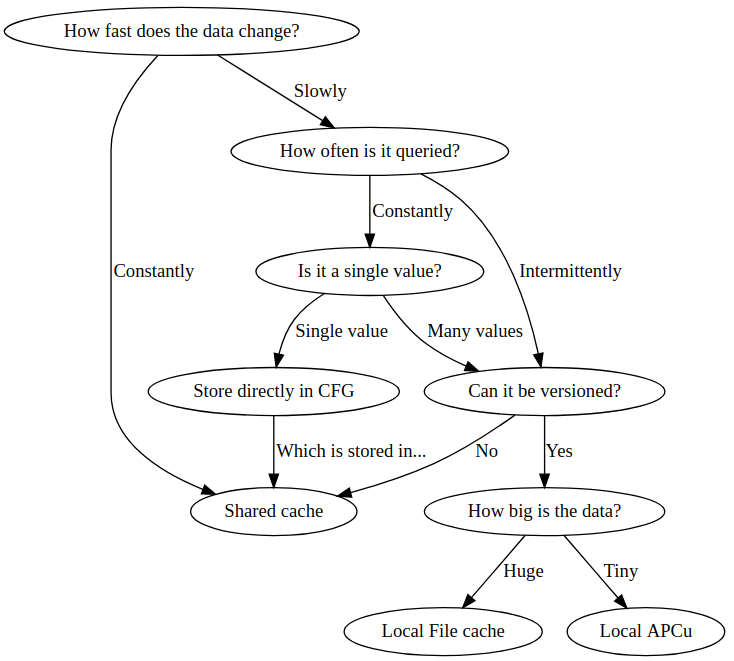
When should you localize?
Not all caches are good candidates to localize and some can have a detrimental effect if localized for the wrong reasons.
Versioned caches
When data changes, you can often identify a 'version' by either a numeric time value, or an incremented version number, in the database.
When you have a version number, the best way to ensure that cached data is current (the cache does not return data from old versions) is to use the set_versioned and get_versioned functions within the cache. These must be used as a pair - you cannot set data with set_versioned and retrieve it with get, or vice versa.
The get_versioned function takes a required version integer, and will only return cached data that is equal to, or newer than, the required version. Optionally, you can also have it provide the actual version that was returned, in case it is newer than requested.
These functions work efficiently with multi-layer caches:
- If the correct version is available in local cache, it will be returned directly without accessing the shared cache; otherwise it will be requested from shared cache and stored in the local cache.
- When a new value is set, it will be set in both local cache and shared cache.
- These properties mean that if a new cache version needs to be computed, it will usually only be computed on a single server (except for race conditions, which you can avoid using locking if required) and that reading the cached data is efficient.
At each point, the cache stores only a single version, which is important for large cached data such as course modinfo because the older approaches (below) can waste cache memory by storing older unnecessary versions.
Version numbers as key suffix
An earlier approach is using the same type of version number and appending that to your key. This works, but uses more storage in the cache, especially if data items are large or change frequently.
Version numbers as value suffix instead of key suffix
Another earlier approach was to store revision numbers inside the cache value. This avoids storing duplicate copies of the same cache entry but is not recommended because it is difficult to ensure correct data on multi-level caches. Instead, the versioned cache functions should now be used.
Incrementing version numbers
If you increment a number for each version, you need to use database transactions or locks to ensure that the same number is not used twice due to race conditions.
Timestamps as version numbers
Another common approach is to use a timestamp, this is how some of the core cache numbers work, see increment_revision_number() for some examples. This has the benefit of not needing any transaction or locking, but you do run the risk of two processes clashing if they happen to run in the same second.
It may look like Moodle theme-related caching uses this strategy, but actually if you look at the code for theme_get_next_revision, you will see that it is actually guaranteeing to generate a unique new integer which mitigates the clashing mentioned above. It is just making that integer close to current time-stamp, to make it more self-documenting.
https://github.com/moodle/moodle/blob/main/lib/datalib.php#L1131-L1145
It works best with a cache store that supports Least Recently Used garbage collection, or when using the versioned cache functions.
Content hashes as keys
A great strategy is to use a digest or hash such as sha1 / sha256 of the content stored inside the cache, or in even more advanced scenarios a hash of the dependencies of the content in the cache. This guarantees that the key will be unique, and can be truly distributed without any synchronous communication between the front ends.
This strategy can work very well when building up large cache items from many smaller cache fragments in a nested tree structure, eg when caching a structure which is built of other cache items, eg 10 chunks of html to get combined into a large chunk to be cached, you would append the 10 hashes of the 10 smaller chunks and then hash that to use as the key for the combined cache item. This means you can mutate a small part of a tree structure and quickly re-generate the whole tree without expensively regenerating all of the other branches and leaves in the tree.
This is known as 'Russian Doll' caching: https://blog.appsignal.com/2018/04/03/russian-doll-caching-in-rails.html
This is a very common strategy is many distributed systems, outside of the context of caching, and is conceptually how git works internally which is why commits are a sha1 hash.
This strategy works well if you may periodically change back and forth to previous states which will still be present and so be immediate hits without re-warming. It works best with a cache store that supports Least Recently Used garbage collection.
Primary and Final caches
Because HTTP requests are generally assigned randomly or round-robin to front ends, when a cache item version changes you will now effectively have an empty cache on every front end. As you get the same cache item again and again on each front end it will continue to be a cache miss on each local box until they are all warm, which can ironically mean that on average for a fast-changing, but not often requested cache item, your cache hit rate will be very low and much worse than if you had a shared cache. The solution here is to have multiple levels of caches set up, a local cache backed by a shared cache. You do not need to do anything special in the code to support this if your cache is already localizable, the MUC manages this for you, ie if you request a key missing from the local cache it will then request it from the shared cache. If present it will copy it back to the local cache and then return the value. If it is not present in either then your fallback code will generate the item, and it will be written to both cache stores at the same time.
This is especially important if you are scaling up and down the number of frontends quickly. If you suddenly need more horizontal scale and create a bunch of new front ends with empty caches and no shared cache they will all consume even more resources warming up and loading the shared services such as the database and filesystem.
A good rule of thumb is to pair similar types of local and shared caches together. For instance, it is very common to store the Moodle string cache in APCu because it is very heavily used, so an in-memory cache is the fastest and is well paired this a shared cache like Redis. coursemodinfo on the other hand is often very large so isn't as practical to store in Redis so it is usually cached on disk, so you could have a local file cache (which could often be very fast SSD) and pair it with a shared disk cache in dataroot (often much slower over NFS or Gluster).
As you scale even bigger, a new bottleneck can appear when purging a shared disk cache ie when you deploy a new version. A full purge needs to iterate over and remove and sync a very large number of files, which can take some time. See MDL-69088 for a proposed fix.
Beware fast churning keys
A big concern when designing a cache is how fast you anticipate it changing. If it contains very fast moving data but sparsely requested data (see above) then you can end up in a situation where you are effectively just using the shared final cache, and wasting latency and space and IO cloning data to the local cache where is may not be hit again very much. As always caching is a balancing act trading off between CPU, time and disk, and ultimately money.
Even if your cache is able to use a local store that doesn't mean it actually will be configured to be local (and your code can't tell either way). So a wasteful cache item will consume much more space storing all the previous versions of its items even if it isn't localized, and it will be much worse if it is.
Time-To-Live for distributed caches
Another consideration is the total size of your cache stores across all the front ends. As cache keys change they are never be invalidated or purged. So you should have in place some process to garbage collect stale items. This is more a concern for the cache store implementations and the configuration but worth considering. Some stores are deleted on upgrade, or have a Time-To-Live or a Least Recently Used strategy for deleting stale items.
Miscellaneous
- Checkout important discussion about the Cache API at the Moodle developer chat